![Logo (Black Text)-1.svg]](https://support.haystackteam.com/hubfs/Logo%20(Black%20Text)-1.svg)
📌 MCP integrations are an add-on service that are licensed separately than the core intranet platform. If you're eager to use an MCP integration, please reach out to your Customer Success Manager (CSM) or support@haystackteam.com for more details.
Your people are already asking AI for help every day. The problem is that AI tools don't know your company. They don't know your policies, your brand guidelines, or what leadership announced last week, so they guess, or someone copies and pastes.
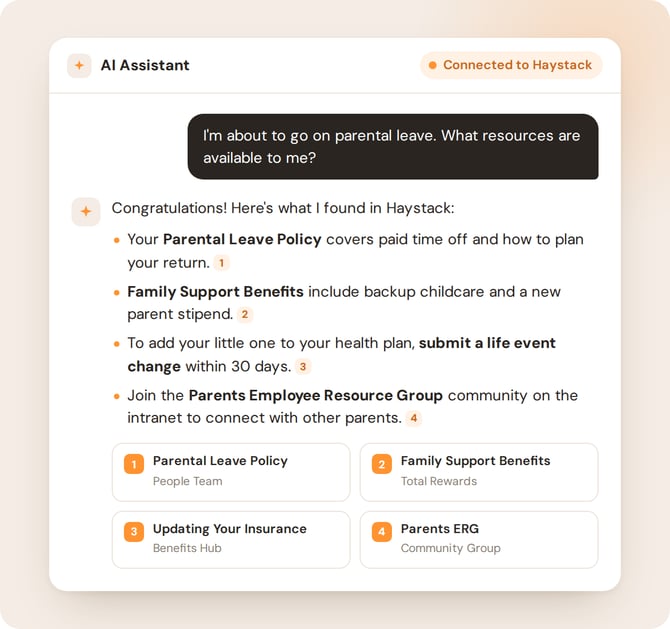
Haystack MCP integrations fix that. Connect your intranet to Claude, ChatGPT, Microsoft Copilot, Slack, or your own custom platform, and every answer comes from your live, verified Haystack content, with citations and your existing permissions fully intact.
What Your Teams Can Do with MCP Connectors
- Internal Comms: Draft announcements in your company's voice using past posts and brand guidelines as the source.
- HR & People Teams: Let employees get instant, accurate answers about benefits, PTO, and policies without filling up your inbox.
- IT & Help Desk: Resolve routine questions in Slack by pointing people straight to the right Haystack page.
- Sales & Client-Facing Teams: Build proposals using official collateral and the latest product messaging.
- Leaders & Managers: Summarize recent announcements, department updates, and cross-functional projects in seconds.
- Everyone: Create private knowledge pages as personal references, checklists, or first drafts.
Why Teams Love MCP Connectors
- Answers you can trust: Responses are grounded in your live Haystack content, not generic web results or outdated uploads, with citations back to the source.
- From idea to intranet in one step: Write in your AI tool and save straight to Haystack as a draft or a published post.
- Security built in: Every connection mirrors each user's exact Haystack permissions. If someone can't see it, or can't post there, in Haystack, they can't through AI either.
- You stay in control: Admins and users choose which Haystack tools each AI app can use.
- No more tab hunting: Knowledge shows up in the tools people already have open, so your intranet gets used more, not less.
MCP Connector Capabilities
Available Now: Search and Read. Search people, teams, posts, events, knowledge pages, and glossary terms from any connected tool, and open the full page or post behind any answer. See Using MCP Search Tools.
Available Now: Post and Page Creation. Draft or publish posts in your groups and create private knowledge pages.
Coming Soon: Events. Create Haystack events right from your AI tools including recurring events.
Have a workflow you'd love to see next? Tell your CSM. We're building the next tools based on your feedback.
Choose Your Integration
Each guide below covers the value, prerequisites, and best practices for that connection:
- Connecting Haystack to Claude via MCP. Integrate Haystack with Claude to perform real-time, internal knowledge searches directly within your Claude AI workspace. Generate drafts, synthesize policies, and check department updates using up-to-date, verified organizational sources.
- Connecting Haystack to Microsoft Copilot via MCP. Bring Haystack into the Microsoft ecosystem so Copilot can synthesize internal strategies and draft with official brand collateral.
- Connecting Haystack to ChatGPT via MCP. Enable OpenAI's ChatGPT to securely query and cite internal Haystack intranet content. Leverage ChatGPT's advanced reasoning alongside live company data to draft client proposals, summarize leadership updates, and retrieve verified citations.
- Connecting Haystack to Slack via MCP. Bring institutional intranet answers directly into Slack channels and direct messages. Teams can ask questions, resolve HR or IT inquiries, and access employee handbooks without ever leaving their primary chat interface.
- Connecting Haystack to Custom MCP Connectors via OAuth 2.0. Extend Haystack's reach by securely connecting to non-native or custom third-party platforms (such as Moveworks, Zendesk, or Leena AI) using standardized OAuth 2.0 authentication to ensure safe, credential-free data access.
- Connecting Haystack to Gemini via MCP. Connect Gemini to the Haystack MCP server with a server URL.
MCP Connector Security
Across all official and custom MCP connections, Haystack maintains strict platform boundaries:
- Strict permission honor: Integrations mirror each user's Haystack permissions. Restricted documents, private HR spaces, and sensitive project groups stay invisible to unauthorized users.
- Posting permissions apply too: People can only create posts in groups where they can already post in Haystack. Pages created through AI are private to their creator.
- Personal sign-in: Every user connects with their own Haystack account through a secure sign-in. No shared keys.
- Data security: Your Haystack data is never used to train any AI models.
How to Get Started
- Talk to your CSM. They'll walk you through licensing and help you choose the right integrations. Not sure who to reach out to? Email support@haystackteam.com and we'll connect you.
- Connect your AI tool. Follow the setup guide for your platform above. Most connections take just a few minutes, and there's no client ID or secret to manage.
- Roll it out. Share the connection with your teams and the prompt examples in Using MCP Search Tools and Using MCP Creation Tools.
Best Practices & Support
- Be specific and ask for citations: Try "Summarize our travel policy from Haystack and cite the page title."
- Start with drafts: Ask your AI tool to save posts as drafts so you can review them in Haystack first.
- Keep intranet content fresh: Every query pulls from Haystack in real time, so up-to-date pages mean up-to-date answers.
- Vet custom solutions: Third-party implementations vary, so validate compatibility with your CSM before rolling out a custom connector.
Let's connect your knowledge to your AI. Reach out to your Customer Success Manager or email support@haystackteam.com to get started.