![Logo (Black Text)-1.svg]](https://support.haystackteam.com/hubfs/Logo%20(Black%20Text)-1.svg)
📌 MCP integrations are an add-on service that are licensed separately than the core intranet platform. If you're eager to use an MCP integration, please reach out to your Customer Success Manager (CSM) or support@haystackteam.com for more details.
Overview & Value
Unlocking your company's knowledge within OpenAI's ChatGPT opens up new levels of productivity for every department. By integrating Haystack with ChatGPT, users can leverage ChatGPT's advanced reasoning alongside your company's unique, internal data.
Ask ChatGPT to synthesize internal strategies, draft client proposals using official brand collateral, or summarize recent leadership announcements. Instead of generating generic answers or relying on outdated uploads, ChatGPT queries your live Haystack environment securely, returning accurate, contextual responses complete with internal references.
What is an MCP?
Think of a Model Context Protocol (MCP) as a secure digital bridge between your AI engine (ChatGPT) and your internal repository (Haystack). Similar to how a home streaming device connects your TV to your movie app, an MCP allows ChatGPT to tune directly into your company’s internal library to retrieve verified information when you need it.
What Your Team Can Do
- Sales & Client-Facing Teams: "Search Haystack for our latest product messaging and draft a one-page overview for a prospect."
- Leaders & Managers: "Summarize recent leadership posts and the main themes I should reinforce with my team."
- Internal Comms: "Write a draft post for the Marketing group celebrating our Q3 wins, under 200 words."
- Anyone: "What does [acronym] mean at our company? Check the Haystack glossary."
Why Your Team Will Love This
- Answers you can trust: Responses come from your live Haystack content, with links back to the source.
- From idea to draft in one step: Draft in ChatGPT, save to Haystack, and publish when you're ready.
- Security built in: ChatGPT only sees, and only posts where, each person already can in Haystack.
MCP Connector Capabilities
Available Now: Search and Read. Search people, teams, posts, events, knowledge pages, and glossary terms from any connected tool, and open the full page or post behind any answer. See Using MCP Search Tools.
Available Now: Post and Page Creation. Draft or publish posts in your groups and create private knowledge pages.
Coming Soon: Events. Create Haystack events right from your AI tools including recurring events.
Have a workflow you'd love to see next? Tell your CSM. We're building the next tools based on your feedback.
Setup Prerequisites & Permissions
- MCP add-on: Your Haystack workspace is licensed for MCP integrations.
- Official app available: Haystack has an official app in ChatGPT. No client ID or secret is needed.
- ChatGPT plan: ChatGPT apps/connectors are available across plans, but availability varies by plan, region, workspace settings, and the specific app. For custom MCP connections, full MCP support (including write/modify actions) is available on ChatGPT Business, Enterprise, and Edu. ChatGPT Pro supports custom MCP connections with read/fetch permissions.
-
Workspace admin approval: On Business, admins/owners manage and publish custom MCP apps. On Enterprise/Edu, admins/owners manage publishing and can control access through role-based permissions. For existing apps, workspace settings may also restrict availability, so users may need their admin to enable or approve the Haystack app before connecting.
-
Platform note: Custom MCP connections are currently supported on ChatGPT web, not mobile. Availability and functionality may change as MCP support continues to roll out.
- User permissions: The integration mirrors each user's Haystack permissions. Users can't view, retrieve, or create anything through ChatGPT that they couldn't in Haystack.
Step-by-Step Guide
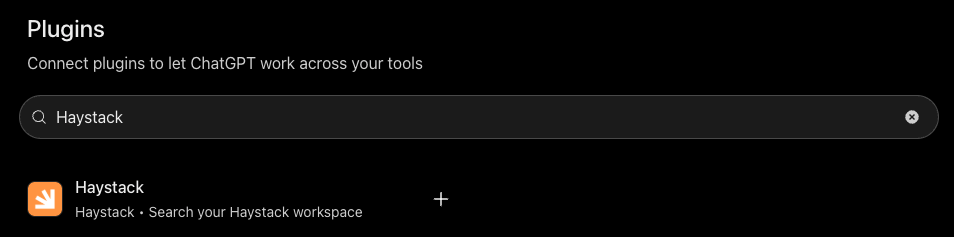
- In ChatGPT, go to [Settings > Plugins].
- Search for Haystack and select the Haystack app.
- Select Connect.
- Enter your workspace name (the word before ".haystack.so" in your Haystack URL), then sign in with your Haystack account and approve access.
- In a new chat, select Haystack from the tools menu [confirm] and ask: "What can you do with the Haystack connector?"
💡 Already connected before this update? Uninstall the Haystack app and connect it again so ChatGPT loads the new creation tools.
Best Practices
- Prompt for citations: Ask for sources (e.g., "Summarize our travel policy from Haystack and cite the page title").
- Save posts as drafts first: Review and publish in Haystack.
- Cross-reference fresh pages: For fast-moving projects, make sure key documents are published and verified in Haystack so ChatGPT finds the latest version.
- Keep credentials private: Always log in through the secure sign-in window. Never share private login details in a prompt.
Need More Help?
- Chat with us: Available via the support bubble on this page. Our AI support agent, Luna, will do her best to answer your questions. Anything she's unable to answer will get routed to us humans.
- Email us: support@haystackteam.com
- Got Feedback? What would make these tools more useful for your team? Your feedback shapes the future of Haystack's MCP connectors. Share it with your CSM or at support@haystackteam.com.