![Logo (Black Text)-1.svg]](https://support.haystackteam.com/hubfs/Logo%20(Black%20Text)-1.svg)
📌 You'll need to have Admin or Group Owner permissions to see a post's insights. If you're not sure about your permissions, just reach out to your platform admins or our team at support@haystackteam.com for a hand.
Post insights provide you with detailed analytics about each post created within your workspace. They also allow you to resend email notifications to users who've not yet seen the post.
How to View Post Insights
Ready to see the stats? Just follow these two quick steps:
-
Navigate to the post you want to check the analytics for.
-
Click the three-dot button in the top right corner and select Insights from the dropdown menu.
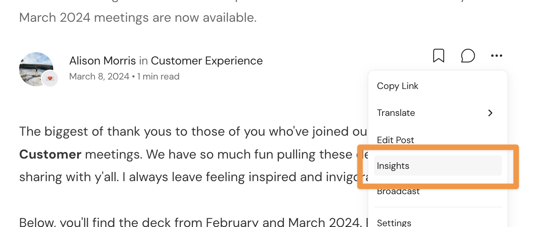
This will open a pop-up window with all the good stuff (see below for good stuff).
Understanding What You See
Inside the insights window, you'll find different tabs with helpful metrics.
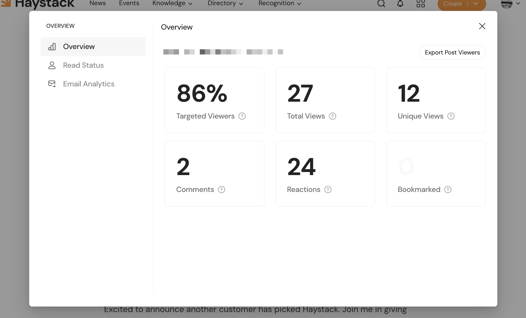
The Overview Tab
This tab gives you the big picture of your post's performance.
-
Targeted Viewers: The percentage of the audience who has viewed the post via web, mobile, or email. The target audience here is the group of people the post was shared with.
-
Total Views: The total number of times the post has been viewed, including repeat views from the same person.
-
Unique Views: The number of different people who have viewed the post. (This counts each person only once!)
-
Comments: The total number of comments left on the post.
-
Reactions: The total number of emoji reactions on the post.
-
Bookmarked: The number of users who have bookmarked the post so they can easily find it later.
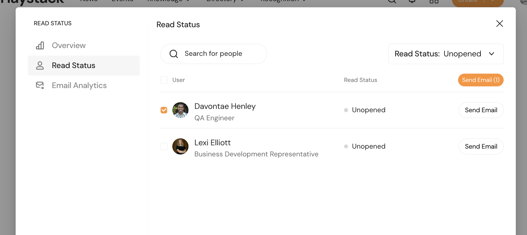
The Read Status Tab
This is a great tool for following up! Here, you'll find a handy list of who has and hasn't seen the post yet. You can see all the audience members who have read the post or for whom the post remains unopened. You can also use the dropdown to filter the audience and then use the tick boxes to select people and click "Send Email" to resend the notification!
The Email Analytics Tab
This tab shows you how your post's email notifications are doing. These metrics are also included in the totals on the Overview tab.
-
Sent: The number of notification emails sent out from the Haystack server.
-
Delivered: The number of emails that successfully made it to your team's inboxes.
-
Failed: The number of emails that didn't go through.
-
Views: The total number of email views, including repeat views.
-
Unique Views: The number of people who opened the email.
Go see how your post is performing! Happy communicating!
Keywords: post insights, analytics, post views, content performance, metrics, resend email, read status, admin, group owner, user engagement, reporting