![Logo (Black Text)-1.svg]](https://support.haystackteam.com/hubfs/Logo%20(Black%20Text)-1.svg)
When searching for content, people, or posts in Haystack, you might notice that search results adapt depending on whether you are using the instant dropdown menu or pressing Enter to open the full search page.
This behavior is designed intentionally to provide fast, high-level previews while keeping full search results relevant and high quality.
Quick Search (The Dropdown Preview)
As you type into the top search bar, Haystack displays an instant preview menu.
- Partial Word Matching: Quick search matches partial word inputs or prefix strings. For example, typing
"jo"will match names like Joan or pages that include "Internal Jobs Board".
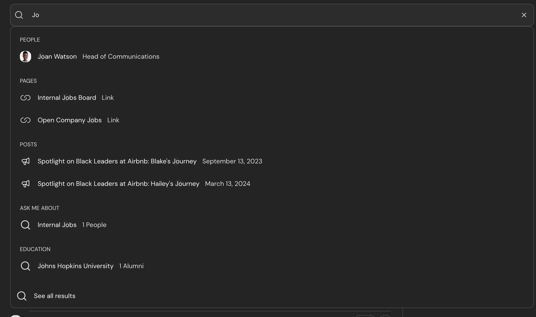
- Breadth Over Depth: The dropdown has a limited number of display slots. Rather than showing every single team member who matches a two-letter prefix, the quick search spreads available slots across all category types (People, Groups, Pages, Posts, and Tags).
- Why Some Results Aren't Shown First: If a short query matches dozens of items across multiple categories, some team member cards may get crowded out of the limited preview slots to ensure you see a broad overview of matching content types.
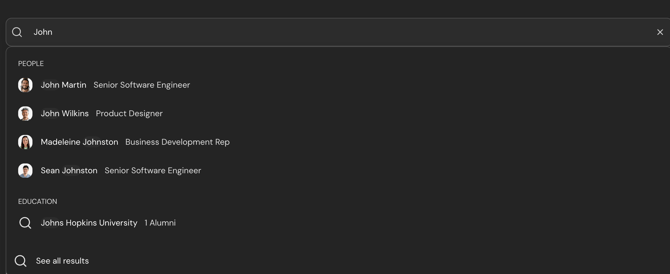
Tip: Adding a second word or more characters narrows down the preview results significantly (e.g., searching
"John"instead of"jo"). Note that spaces act as token separators, so adding a trailing space will change the preview query focus.
Full Search Page (Pressing Enter)
Pressing Enter takes you to the dedicated Search Page.
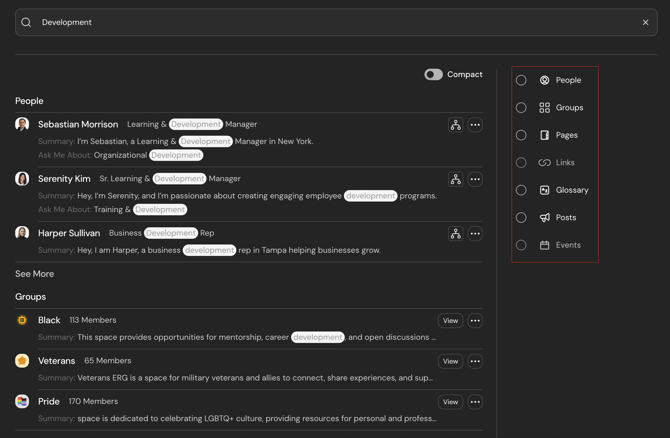
- Whole-Word Matching: The main search engine evaluates full text across posts, pages, comments, and profile data using whole-word token matching rather than prefix fragments.
- Why Whole Words? Fragment matching across all intranet documents with very short queries (like
"dev") would return irrelevant hits. Whole-word (like"development") matching ensures accurate ranking and clean text highlighting. - Once you hit "Enter", your search results will populate with all of the relevant terms within your workspace. From here, you can filter by categories on the right side of the page to narrow down exactly what you are looking for.
Summary Comparison
| Feature | Quick Search Dropdown | Full Search Page (Enter) |
| Primary Goal | Instant preview across all categories | Comprehensive search across document & intranet content |
| Matching Method | Partial/Prefix matching ("jo" finds Jordan) |
Whole-word token matching |
| Result Scope | Top items across People, Pages, Groups, Posts & Tags | Full list ranked by relevance and full-text match |
Need More Help?
- Chat with us: Available via the support bubble on this page.
- Email us: Reach out to support@haystackteam.com.
Keywords: haystack search, quick search, full search, directory search, search results, word matching, search bar, partial matching