![Logo (Black Text)-1.svg]](https://support.haystackteam.com/hubfs/Logo%20(Black%20Text)-1.svg)
📌 Only users with Workspace Admin permissions can configure group creation permissions in your workspace. If you're unsure about your permissions, reach out to your platform admins or our team at support@haystackteam.com.
Want to make sure your workspace stays perfectly organized? You can easily choose who has the power to create new groups. By default, everyone can create a group, but if you'd like to limit that permission, you can do it in just a few clicks!
How to Configure Group Creation Permissions
Ready to get your group settings just right? Here's how:
- Click the Account Dropdown in the top right corner of your screen and select Admin Console.
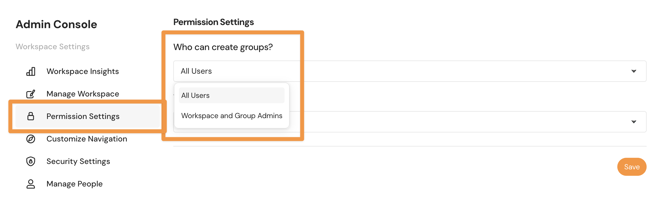
- In the left-hand navigation menu, click Permissions Settings.
- Click the "Who can create groups?" dropdown to select your new preference.
- All Users: This option allows anyone in your workspace to create groups.
- Workspace and Group Admins: This option will limit group creation to only users who have Workspace Admin or Group Admin permissions.
- Click Save at the bottom of the page.
All set- now go get that workspace organized! ✨
Best Practices
- Review Group Needs Often: If you restrict group creation, make sure your team has a clear, easy way to request a new group from your Workspace Admins (like a quick form or dedicated Slack channel).
Need More Help?
- Chat: Click the chat icon in the bottom right of the screen.
- Email: support@haystackteam.com
Keywords: group creation, permissions, admin, access control, manage groups, group settings, configuration, workspace admin, intranet organization, governance