![Logo (Black Text)-1.svg]](https://support.haystackteam.com/hubfs/Logo%20(Black%20Text)-1.svg)
📌 All the settings, permissions, and even the original publish date stay exactly the same when you bring content back. And don't worry—restoring content doesn't send out any new notifications, so it's a quiet rescue mission. 🤐 We won't tell if you don't.
Bringing Content Back to Life (Restoring)
Ready to pull that content out of retirement? Here's how to restore it with just a few clicks.
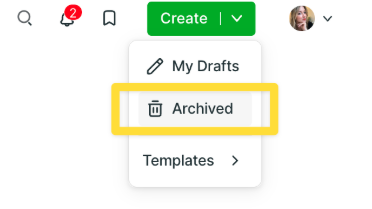
- Click on the downward arrow next to the create button and click on Archived.
- From the archived content list, find the item you want to restore.

-
Click the three-dot button to the right of the content.

-
Click Restore in the dropdown menu.
That's it! The content automatically returns to the group it was in before. 🙌
Keywords: Haystack, archive, restoring content, deleted content, managing content, guide, tutorial, safety net, posts, pages, events