![Logo (Black Text)-1.svg]](https://support.haystackteam.com/hubfs/Logo%20(Black%20Text)-1.svg)
The power of Haystack lies in its ability to act as a single source of truth for your organization. Instead of sending employees to dozens of different browser tabs, you can embed the tools your team already uses. Most embeds are live, meaning any changes made in the original tool (like a Smartsheet or a Google Slide) will update automatically inside Haystack.
Prerequisites & Permissions
-
Access: Any user with "Create" permissions for Posts or Pages can use the /-editor to add these embeds.
-
Authentication: For secure tools (like Google Drive or SharePoint), users will only see the content if they already have permission to view that file in the native application.
Directory of Embeddable Tools
| Third Party | Tool Overview | When to Embed in Haystack |
| Airtable | A collaborative database platform. | Best for sharing live project trackers or campaign calendars. |
| Box | Cloud content management and file sharing. | Helpful for providing direct access to secure departmental folders. |
| Canva | Graphic design for social media and decks. | Perfect for "Live" brand posters or event flyers. |
| Ceros | No-code interactive content creation platform. | Ideal for embedding highly visual, immersive landing pages, infographics, or digital brochures. |
| Cognito Forms | Advanced online form builder. | Use for complex workflows like expense or IT approvals. |
| Dropbox | Cloud storage for file synchronization. | Great for linking shared creative assets without re-uploading. |
| Figma | Collaborative interface design. | Ideal for showcasing "Live" prototypes or design systems. |
| FlipSnack | Digital flipbook and catalog maker. | Excellent for making company handbooks feel interactive. |
| Google Calendar | Time-management and scheduling. | Helpful for "Team Out of Office" or "Holiday" calendars. |
| Google Drive | File storage (Docs, Sheets, Slides). | The "go-to" for live policies or trackers updated daily. |
| Google Forms | Survey administration software. | Best for quick internal pulses or RSVP collections. |
| Jotform | Powerful form builder with app integrations. | Useful for new hire onboarding or equipment sign-outs. |
| Looker | Business intelligence and data analytics. | Perfect for Leadership pages to show live, high-level KPIs. |
| LucidChart | Intelligent diagramming application. | Helpful for "Live" org charts or process flowcharts. |
| Microsoft OneDrive | Personal file hosting and synchronization. | Best for sharing small team documents in a specific Post. |
| Monday.com | Project management and task tracking. | Great for "Live" project boards to see status at a glance. |
| PowerBI | Business analytics by Microsoft. | Essential for sharing complex interactive data dashboards. |
| Scribe | Automatic step-by-step guide creator. | The best way to embed "How-To" software tutorials. |
| SharePoint | Web-based collaborative platform. | Crucial for surfacing documents stored in SharePoint sites. |
| Smartsheet | Dynamic work management platform. | Ideal for complex Gantt charts and project schedules. |
| Tableau | Visual analytics and data visualization. | Best for highly interactive, beautiful data dashboards. |
| Unsplash | High-quality stock photography. | Find professional imagery to break up long blocks of text. |
| Vimeo | Professional video hosting. | Best for internal "Town Hall" or creative recordings. |
| Wistia | Video hosting with marketing analytics. | Useful for training videos that require engagement data. |
| Worktango | Employee experience and recognition. | Helpful for surfacing live recognition or culture feeds. |
| YouTube | World's largest video platform. | Best for public company content or training clips. |
How to Embed In-Line Content
To start adding these powerful integrations to your workspace, you’ll use the Haystack /-editor. This tool allows you to search for and select any of the third-party platforms listed above and drop them directly into your draft.
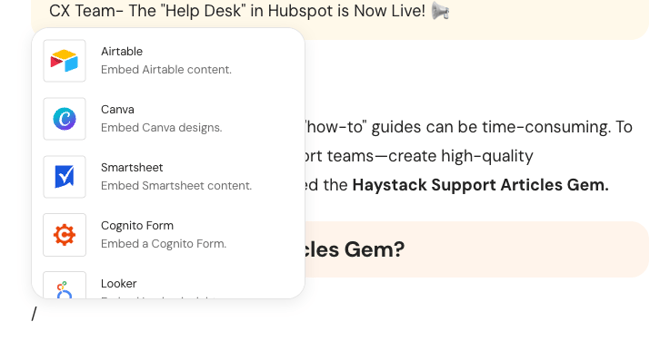 For a full walkthrough on using the editor to add formatting, media, and these interactive blocks, please see our guide: Mastering the Haystack Content Editor
🔔 Important Reminder on Email Notifications: Because email clients do not support the iframe technology required for these interactive views, in-line embeds will not display directly within an email notification. Instead, the email will include a clear Call to Action (CTA) button, prompting the user to visit the post or page in Haystack to see the live details.
Best Practices for Embedding
-
Check Your Permissions: Always ensure the "Share" settings in the third-party tool allow your organization to view the content.
-
Keep it "Live": Embed the file rather than using a screenshot so that updates reflect automatically.
-
Label Your Embeds: Use a "Heading" block above your embed to explain the context to the reader.
Need More Help?
Don't see your favorite software on this list? We are constantly expanding our in-line capabilities!
-
Request a new tool: Reach out to us via support chat, email us, or talk to your Customer Success Manager (CSM).
-
Email: support@haystackteam.com.
Keywords: In-line Integrations, Content Embeds, Third-party tools, iframes, /-editor, Google Drive, SharePoint, CSM, Product Feedback, Email Notifications.