![Logo (Black Text)-1.svg]](https://support.haystackteam.com/hubfs/Logo%20(Black%20Text)-1.svg)
📣 Only users with Workspace Admin permissions can configure confidentiality disclaimers in your workspace. If you're unsure about your permissions, reach out to your platform admins or our team at support@haystackteam.com.
How to Turn On a Confidentiality Disclaimer
Ready to get your legal disclaimer added? It only takes a few clicks!
-
Click the account dropdown in the top right corner of your screen and select Admin Console.
-
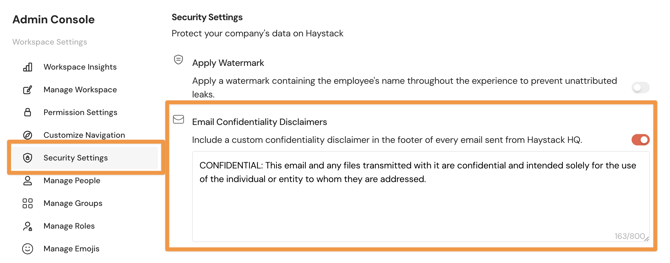
In the left-hand navigation menu, click Security Settings.
-
Toggle on Email Confidentiality Disclaimers. Use the text space below to customize your message. (This space is plain-text only, so no fancy formatting!)
-
Click Save at the bottom of the page.
Once turned on, confidentiality disclaimer footers will appear at the bottom of all notification emails sent from your workspace.
You're all set! Your comms are now extra secure.
Keywords: confidentiality, disclaimer, email footer, security, legal, admin, compliance, security settings, communications